> For the complete documentation index, see [llms.txt](https://www.5mukx.site/llms.txt). Markdown versions of documentation pages are available by appending `.md` to page URLs; this page is available as [Markdown](https://www.5mukx.site/malware-development/analysis-of-ssdt.md).
# Analysis of SSDT
In this post, we will take a look and understand what System Service Descriptor Table or SSDT is and understand it using WinDbg.
In this note, we will take a look and understand what System Service Descriptor Table or SSDT is and understand it using [WinDbg](https://learn.microsoft.com/en-us/windows-hardware/drivers/debugger/debugger-download-tools) tool. Also we will check what happens when an exe is booted and how Ntdll.dll and Win32 APIs are called.
## What is System Service Descriptor Table ?
The **System Service Dispatch Table (SSDT)** is a table in kernel memory that lists the memory addresses of kernel-mode functions (like NtCreateFile, NtReadFile, NtWriteFile, etc.).
Think of it like a phonebook: when the kernel needs to call a function, it looks up the function’s address in the SSDT.
### Why do we need SSDT ?
The kernel has hundreds of functions (called **native APIs** or **system services**) that handle tasks like file operations, process management, and memory allocation.
When a system call is made, the kernel needs to know **which** function to call. For example, if the system call is for NtCreateFile, the kernel must find the address of the kernel-mode NtCreateFile.
The SSDT acts as a map that connects a system call number (a unique ID for each function) to the actual memory address of the function in the kernel.
### Let's start with the example approach.
let's say that you have opened the `Notepad.exe` and you are writing some notes. Now you want to save the save the data. For this operation the windows will call an API's such as [**CreateFileA**](https://learn.microsoft.com/en-us/windows/win32/api/fileapi/nf-fileapi-createfilea) from the `kernel32.dll` . `Kernel32.dll` is a dll that has majority of Win32 APIs for the applications. Now we will try to understand how notepad calls Win32 API and where does SSDT stands.
Notepad calls CreateFileA from kernel32.dll to save the data on disks.
In order to write our content to disks. notepad.exe will call **CreateFileA** API from the **Kernel32.dll** which in turn calls another API internally called [**NtCreateFile**](http://undocumented.ntinternals.net/index.html?page=UserMode%2FUndocumented%20Functions%2FNT%20Objects%2FFile%2FNtCreateFile.html) which is called from `ntdll.dll` file which resides in the userland located in this file is located in the System and System32 system directories. The description of the file is NT Layer DLL. It’s essentially a DLL file that contains core NT kernel functions.
The code of **NtCreateFile** is responsible to make system call i.e **Syscall** or **Sysenter**, after that the **Ntoskrnl.exe** that resides in the kernel space will call the kernel version of the **NtCreateFile** which in fact is same i.e **NtCreateFile** which does the actual work. **Now the SSDT table is used to find out absolute address of the kernel mode version of the NtCreateFile**. Now we have idea of where does the SSDT table lies in the picture. We can move to how SSDT works and try to understand it better. Before we move forward, we must need to understand some basics concepts in order to deep drive.
### What is Syscall ?
A **system call** is a way for a program running on your computer to ask the **operating system** to do something special that the program can’t do on its own. For Example: Think of it like asking a librarian to get a book (a task) from a restricted section (the kernel) that you can’t access directly.
**Why ?** Programs run in a restricted area called **user mode**, where they can’t touch hardware (like disks or memory) or perform sensitive tasks (like creating files or starting processes) directly. These tasks are handled by the **kernel**, the core of Windows, which runs in a protected area called **kernel mode**.
**How?** A syscall is a special instruction that switches from user mode to kernel mode, letting the program ask the kernel to do the job.
#### How does syscall work ?
lets say that we have to save a file using notepad.exe or using some kind of programs. There it uses syscall like `NtCreateFile`. This function is a **stub**—it doesn’t do the work itself but prepares to ask the kernel.
The `NtCreateFile` puts a unique number (called a **system call number**) into a CPU register. For example, NtCreateFile might be number 0x55 ( Might be different from windows versions).
It then runs a special CPU instruction called `Syscall` .
The CPU switches from user mode to kernel mode, handing control to the kernel (specifically **Ntoskrnl.exe**, the heart of Windows.
The kernel looks at the system call number (0x55) and uses the **SSDT** (System Service Dispatch Table) to find the address of the kernel’s version of NtCreateFile.
### What is KiServiceTable ?
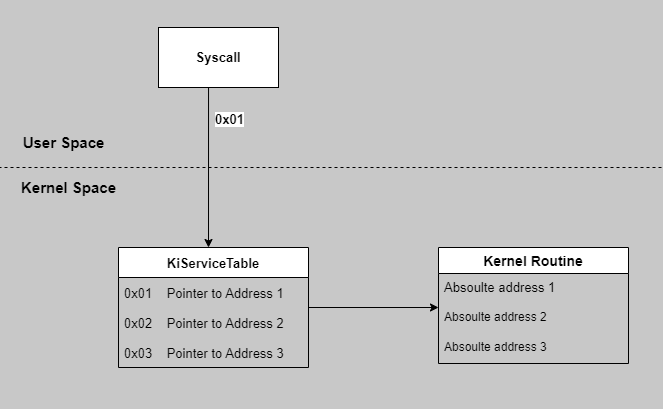
The KiServiceTable is the actual **System Service Dispatch Table (SSDT)** used by the Windows kernel to map syscall numbers to kernel functions. It’s a critical data structure in Ntoskrnl.exe that acts like a lookup table, telling the kernel where to find the code for functions like NtCreateFile.
When a syscall is made (e.g., NtCreateFile with number 0x55), the kernel uses the syscall number as an **index** into KiServiceTable to find the address of the corresponding kernel routine. It’s stored in kernel memory, protected from user-mode access, and referenced by a kernel variable called KeServiceDescriptorTable.
Some sortforms :relaxed::
* **“Ki”**: Stands for “Kernel Internal,” indicating it’s part of the kernel’s low-level machinery.
* **“ServiceTable”**: It’s a table of services (kernel functions) available to syscalls.
### KiServiceTable on 32-bit Windows.
KiServiceTable on 32-bit windows
This is the diagram of SSDT on 32-bit Operating Systems.
We all know that KiServiceTable is an array of **absolute memory addresses**. Each entry points directly to a kernel function in Ntoskrnl.exe. for example
* Index `0x00`: Address of `NtAcceptConnectPort`
* Index `0x55`: Address of `NtCreateFile`
* Each entry is a 4-byte pointer (since 32-bit addresses are 32 bits long).
.... Diagram part goes here with live explanation ->
### KiServiceTable on 64-bit Windows.
Now, let’s explore how KiServiceTable works on a **64-bit** Windows system, using Notepad saving a file.
KiServiceTable on 64-bit windows.
Unlike 32-bit, KiServiceTable stores [**relative offsets**](#user-content-fn-1)[^1] instead of absolute addresses.
before entering deep into the 64-bit versions of KiServiceTable, we need to know some terminology.
#### What are Relative Offsets?
The relative offset address refers to the mechanisms used in 64-bit Windows to store the addresses of kernel routines in the SSDT[^2]. Instead of storing absolute memory addresses (as done in 32-bit systems), 64-bit Windows uses relative offsets to make the kernel more portable and support features like Address Space Layout Randomization (ASLR).
These offsets are calculated relative to the base address of the KiServiceTable itself, allowing the system to dynamically resolve the actual memory addresses of kernel routines at runtime.
Because the KiServiceTable is a critical component of the SSDT, which acts as a bridge between user-mode system calls (syscalls) and their corresponding kernel-mode routines. Each entry in the KiServiceTable for a 64-bit system is a 32-bit signed relative offset that points to a kernel routine (e.g., NtCreateFile, NtOpenProcess). These offsets are adjusted at runtime by adding them to the base address of the KiServiceTable to compute the absolute address of the target routine.
**Why windows use relative offsets?**
* Relative offsets allow the SSDT to remain valid regardless of where the kernel is loaded in memory, supporting ASLR
* ASLR randomizes the memory layout, making it harder for malicious code to predict kernel routine addresses.
* Offsets are smaller than full addresses, optimizing memory usage.
### How does it work ?
Let's say it from the start. A user-mode application calls a system service (e.g., NtCreateFile from ntdll.dll), which issues a syscall instruction with a unique syscall number (e.g., 0x55 for NtCreateFile).
The kernel uses the syscall number as an index into the KiServiceTable.
The entry at that index contains a 32-bit signed relative offset. This offset is right-shifted by 4 bits (divided by 16) and added to the base address of the KiServiceTable to compute the absolute address of the kernel routine.
The kernel jumps to the calculated address to execute the routine.
The formula to calculate the absolute address of a kernel routine is:
```
Absolute Address = KiServiceTable Base Address + (Offset >> 4)
```
**`Offset >> 4`** : The offset is divided by 16 because the lower 4 bits are reserved (often for metadata or alignment purposes).
`KiServiceTable Base Address`: The memory address where the KiServiceTable is loaded.
ok lets get into the action. i am using windbg LiveKD.
First we can check the Service Descriptor Table structure with **KeServiceDescriptorTable**. Note that the first member is recognized as **KiServiceTable** - this is a pointer to the SSDT itself - the dispatch table (or simply an array) containing all those pointers/offsets.
Now let's print out all the values from the SSDT.
Ok thats cool. As you can see the SSDT displays all the offset to the kernel routine. And all those offsets leads to a Win API with it's absolute address. Even though any of those offset can lead to proper results, for this I will select the first two offsets.
{% code fullWidth="false" %}
```nasm
fffff807`03ac78b0 02638404
fffff807`03ac78b4 02836b00
```
{% endcode %}
As we implement with this formula
1. ```
Absolute Address = KiServiceTable + (02836b00 >> 4)
```
2. ```
Absolute Address = KiServiceTable Base Address + (02638404>> 4)
```
2nd output
ohh we have found some API namd NtAccessCheck[^3] !
Ok lets verify it ->
Gotcha. Everything now you can see it. So lets get started !
So lets find the address of All SDDT Routines.
```
.foreach /ps 1 /pS 1 ( offset {dd /c 1 nt!KiServiceTable L poi(keservicedescriptortable+0x10) }){ dp kiservicetable + ( offset >>> 4 ) L1 }
```
Its actually nice to see this but we do not know the what are these api's so we can update the loop a bit and print out the api names associated with those absolute address.
```
.foreach /ps 1 /pS 1 ( offset {dd /c 1 nt!KiServiceTable L poi(nt!KeServiceDescriptorTable+10)}){ r $t0 = ( offset >>> 4) + nt!KiServiceTable; .printf "%p - %y\n", $t0, $t0 }
```
To clear the screen: `0: kd> .cls`
### Let's Track down the NtCreateFile API
Now we've got an idea of how SSDT works and function. We will try to break down an executable in this case notepad.exe to find absolute address of some Win32 API functions. If we refer the figures above you will get an idea of what is happening here. In WinDbg, open the notepad.exe application in the System32 folder.
So far we have seen KiServiceTables using the relative offsets to find the absolute address. lets now track and find the NtCreateFile API
First Lets search for notepad.exe
```
PROCESS ffffa50297b06080
kd> !process ffffa50297b06080
```
This displays detailed info about notepad.exe, including threads and memory.
### Small Challenge: Lets find the SSN for NtCreateFile.
we can try to work out what kernel routine will be called once that syscall is issued. Let's load the debugging symbols for `ntdll` module:
```
0:000 kd > .reload /f ntdll.dll
0:000 kd > lm ntdll
```
Let's now find the syscall for `ntdll!NtCreateFile`:
```
0:000 kd > u ntdll!ntcreatefile
```
so the syscall of `NtCreateFile` is 0x55.
## Credits / References
*
*
Follow me on Twitter:
[^1]: relative offset is a value used to indicate the position of an element by specifying its distance from a reference point, typically the start of a module or section in memory.
[^2]: System Service Dispatch Table or Descriptor table
[^3]: